AI Workflow Guides
How to Build a Content Repurposing Workflow That Keeps Claims Traceable
A practical seven-step process for turning one source into channel-native drafts without losing track of evidence, attribution, voice, or human approval.
The short answer
A reliable content repurposing workflow starts with a source, not a prompt. Register one source you own or have permission to reuse, extract ideas before drafting, classify every important claim, choose a specific audience and objective, adapt the structure for each channel, complete human review, and record one useful learning after publication.
The goal is not to create the largest number of posts. It is to produce a small set of drafts you can trace, review, and approve with confidence.
You have an article, podcast transcript, workshop recording, or long-form video that contains several useful ideas. You ask an AI tool to turn it into a LinkedIn post, a newsletter, and a Pinterest description.
The drafts arrive quickly. They also create a new review problem. Which statements came from the source? Which details were added by the model? Does the LinkedIn version sound like you? Is the newsletter simply the same post with more words? Has a confident statistic appeared without evidence?
This is why content repurposing is not only a writing task. It is a small editorial workflow. The source, claims, channel choices, revisions, and final approval all need a visible place.
What a content repurposing workflow is
A content repurposing workflow is a repeatable process for transforming one approved source into new assets for specific audiences and channels. A complete workflow keeps the original source, extracted ideas, claim status, transformation objective, channel decisions, review notes, and approval status connected.
That is different from pasting an article into a prompt and asking for ten posts. A prompt may generate text. A workflow helps you decide whether that text is supported, useful, appropriately attributed, adapted to the channel, and ready to publish.
The source can be an article, transcript, podcast, presentation, video, research note, or other material you own or have permission to reuse. If the reuse rights are unclear, resolve that question before drafting. A workflow can organize editorial decisions, but it does not replace copyright or legal review.
The seven steps
1. Register one source
Start with one source and record enough information to find it again: title, creator, format, location, date, intended audience, and reuse basis. Do not begin with a folder of loosely related links. One clearly identified source makes later review much easier.
Also state what the source is for. A consultant’s original article may support thought-leadership posts. A webinar transcript may support a follow-up newsletter. A product manual may support an educational Pin. The reuse objective should match the material you actually have.
2. Extract ideas before drafting
Pull out the argument, supporting points, examples, useful lines, questions, and possible calls to action. Record where each item appears in the source. This separates comprehension from copywriting.
If you ask for final channel drafts immediately, extraction and invention can blur together. A separate extraction pass makes it easier to notice when a later sentence has no source location.
3. Classify claims
Not every extracted item has the same evidence status. Use a small, practical set of labels:
- Verified from source: the source directly supports the statement.
- External / attribution required: the statement comes from another identifiable source and needs appropriate attribution.
- Opinion / experience: a viewpoint that should be framed as judgment rather than fact.
- Assumption / verify before use: plausible, but not yet supported.
- Do not use: unsupported, irrelevant, misleading, private, or otherwise unsuitable.
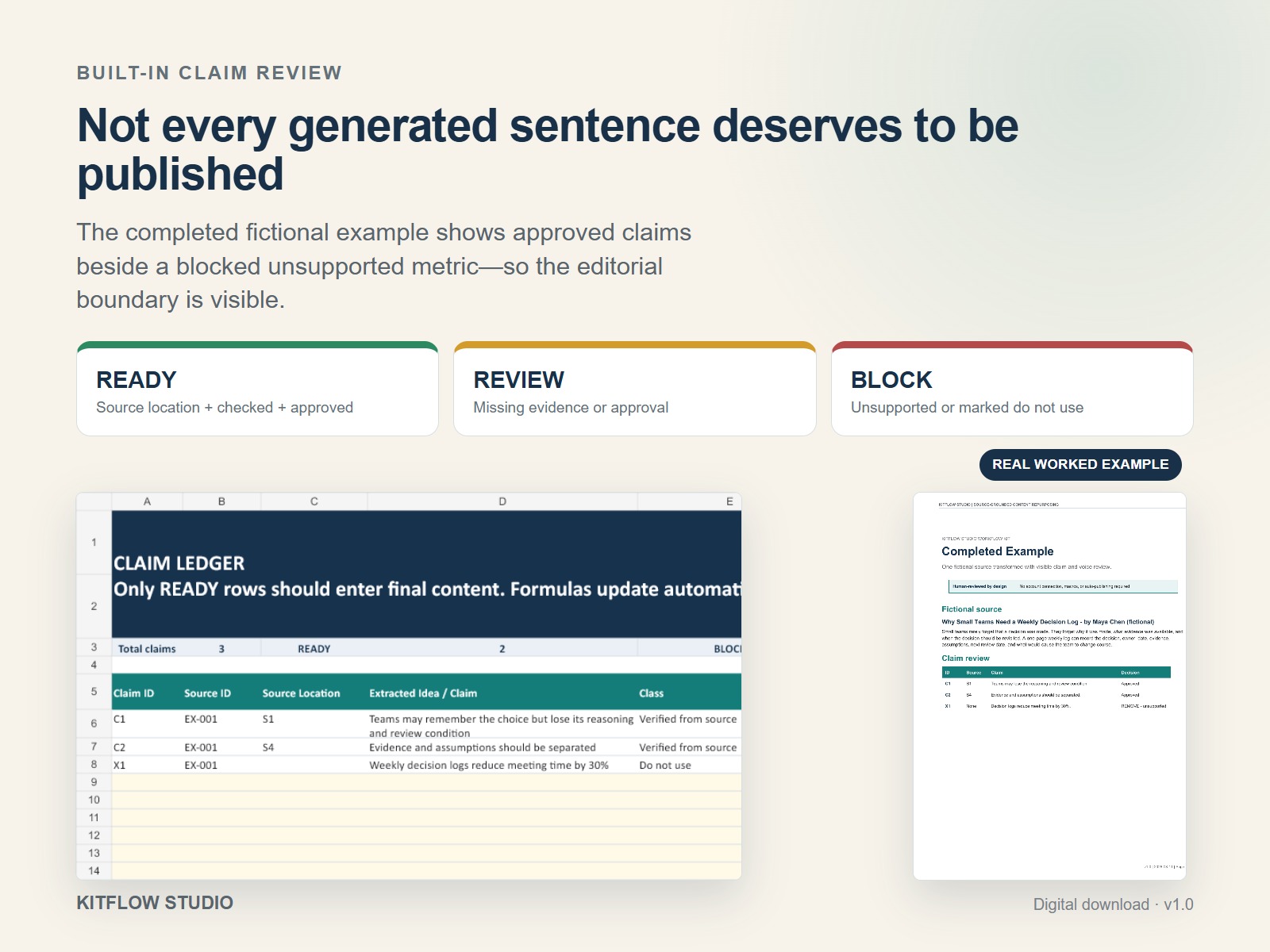
Then assign a working status such as READY, REVIEW, or BLOCK. The labels are useful because they turn a vague feeling—“this sentence might be risky”—into a visible editorial decision.
4. Choose one objective and audience
Repurposing works better when every derived asset has one job. Decide who should read it, what they should understand or do next, which source ideas are relevant, and which ideas should be left out.
The same article may support a practical LinkedIn lesson for founders and a reflective newsletter for subscribers. Those are two transformations, not one generic draft copied twice.
5. Draft channel-native versions
Adapt the structure, not only the length. A channel-native draft uses the reading behavior, formatting, and destination of that channel. Keep the approved claims connected to their source locations while changing the hook, sequence, examples, and call to action.
6. Complete human review
Review each draft for accuracy, attribution, voice, usefulness, channel fit, and call-to-action alignment. Check links and destinations. Remove unsupported specifics. Rewrite generic phrases. Confirm that the final version still serves the objective chosen in step four.
AI can assist with extraction, alternatives, restructuring, and first drafts. It cannot grant approval on your behalf. The final status should belong to a person who understands the source and the publishing context.
7. Record one useful learning
After publication, record one or two signals that can improve the next transformation: replies, saves, outbound clicks, qualified questions, newsletter clicks, or another channel-appropriate outcome. Avoid collecting every available number if none of them will change the next decision.
Early data can be noisy. Record the source, asset, channel, date, and known contamination such as your own test views. The purpose is to learn which source ideas and transformations deserve another iteration.
What to track in a claim ledger
A claim ledger does not need to be a complex database. One row per important statement is enough. Useful fields include:
- claim ID and source ID;
- exact source location or excerpt;
- draft claim;
- claim type and attribution requirement;
- fact-check or review status;
- approval status;
- review note and date.
Traceability matters most for details that sound precise: statistics, time savings, customer outcomes, comparisons, quotations, certifications, and performance claims. Fluent wording is not evidence.
What changes by channel
The supporting idea can remain the same while its presentation changes.
| Channel | Useful structure | Review emphasis |
|---|---|---|
| Recognizable problem, clear point of view, practical takeaway, focused discussion prompt | Voice, unsupported authority claims, readability, link or CTA fit | |
| Newsletter | Subject line, context or short story, explanation, useful next step, relevant destination | Promise-to-content match, attribution, sequence, subscriber relevance |
| Searchable title, specific visual promise, concise description, accurate destination | Image truthfulness, keyword fit, alt text, UTM, landing-page match |
Simply shortening a newsletter into a LinkedIn post or turning a headline into a Pinterest title may miss the reason people use each channel. Channel adaptation is an editorial decision, not a character-count exercise.
A compact worked example
The completed example in the KitFlow workflow kit uses a fictional consultant, Maya Chen, and a fictional 1,200-word article titled Why Small Teams Need a Weekly Decision Log.
The source supports a practical method: record the decision, owner, date, available evidence, assumptions, next review date, and the condition that would change the team’s mind. Those ideas can be traced to source locations and adapted into several formats.
During drafting, an AI-style sentence appears: “Decision logs reduce meeting time by 30%.” The number sounds useful and specific. The fictional source does not contain it, and no external evidence has been registered. The ledger therefore marks the claim REMOVE — unsupported.
The final LinkedIn version keeps the supported insight and removes the invented metric. The newsletter opens with the familiar problem of a decision returning after its reasoning has disappeared into chat or memory. The Pinterest brief turns the same source into a searchable educational visual about a seven-field decision log.
No channel needs the unsupported number. The source contains enough useful material once the transformation focuses on the real idea.
When not to repurpose a source
Do not repurpose material simply because it exists. Stop or change direction when:
- you do not own the source and do not have a clear basis for reuse;
- the source is outdated, inaccurate, incomplete, or no longer aligned with your position;
- the new audience needs evidence or context the source does not provide;
- the transformation would expose private, confidential, licensed, or customer information;
- the only way to make the asset interesting is to add claims you cannot support;
- the destination channel does not suit the material or business goal.
Sometimes the right decision is to update the source first. Sometimes it is to create a new original asset. A workflow should make those decisions easier to see, not force every source into every channel.
Limitations of AI-assisted repurposing
AI tools can help identify themes, organize excerpts, propose structures, create alternatives, and produce first drafts. They may also flatten a distinctive voice, remove necessary nuance, add unsupported details, misread attribution, or produce channel copy that is fluent but generic.
A source-grounded workflow reduces those risks by keeping evidence and approval visible. It does not guarantee factual accuracy, copyright compliance, platform performance, reach, leads, sales, or time savings. It also does not replace subject-matter, editorial, legal, or platform-policy review when those are required.
Do not paste private client material, confidential documents, personal data, or restricted sources into an AI service without an appropriate privacy and permission review.
When a template helps—and when it does not
A template helps when the process repeats and the review fields matter: source registration, excerpt locations, claim status, transformation plans, channel drafts, approval, and outcome learning. It can reduce the chance that an important check disappears between tools or collaborators.
A template will not make a weak source useful, grant reuse permission, prove an unsupported claim, recover your voice without examples, or decide whether a sensitive statement should be published. The person using it still supplies the judgment.
KitFlow Studio product
Use the editable source and claim ledger on one real source
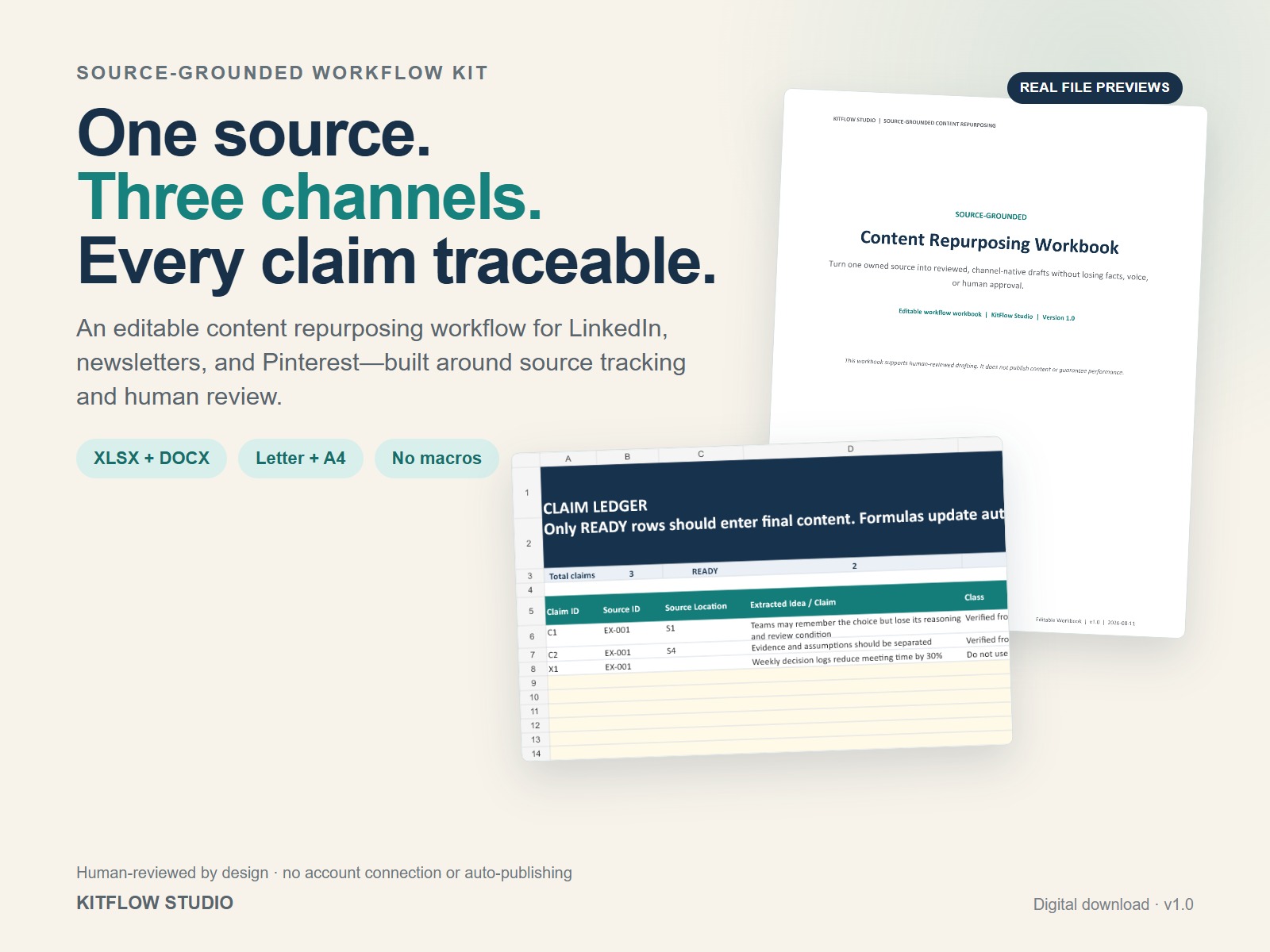
KitFlow Studio created the paid Source-Grounded Content Repurposing Workflow Kit to make the seven steps in this guide visible and reusable. It includes an editable six-sheet Excel ledger, ten-page Word workbook, prompt blocks, channel cards, a completed fictional example, QA guidance, and US Letter/A4 reference files.
It is a one-time digital download. It does not include software access, account connections, macros, scheduling, auto-publishing, or guaranteed content results.
Frequently asked questions
What is a content repurposing workflow?
It is a repeatable process for transforming an approved source into new channel-specific assets while keeping source locations, claims, adaptation decisions, review, and approval connected.
How many channels should one source support?
There is no required number. Start with one or two transformations that match the source and your actual audience. Add another channel only when it has a clear job and destination.
How do I prevent AI from inventing claims?
Extract source-supported ideas first, require a source location for important claims, mark unsupported details as REVIEW or BLOCK, and complete human fact and attribution checks before approval. These steps reduce risk but do not guarantee that every error will be caught.
Can I repurpose someone else’s article or video?
Do not assume public availability means permission to reuse. Use material you own, material you are authorized to reuse, or appropriately attributed material within the permissions and rules that apply to your situation.
What is the difference between prompts and a workflow?
A prompt asks an AI tool to perform a task. A workflow connects inputs, source evidence, decisions, drafts, review, approval, and learning. Prompts can sit inside a workflow, but they do not replace it.
Do I need an automation tool?
No. A spreadsheet, document, and consistent review process can be enough. Automation may become useful at higher volume, but it should not hide source, claim, or approval decisions.